Game guide
Townscaper Unblocked: Controls, Tips and Strategy
Townscaper guide: how to place blocks, choose colors and build a charming island town in this relaxing sandbox.
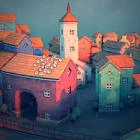
Click to place colorful blocks and watch a relaxing island town grow around you. There is no score and no way to lose.
This Townscaper Classroom 8x page explains how to play Townscaper HTML5 in a normal browser tab, with nothing to download. Students often search for Townscaper unblocked because the game is light enough for a school Chromebook, although whether it opens depends on your school's network rules.
Play Townscaper- GenreSandbox, Casual, Simulation
- PlayersSingle player
- Works onModern desktop and mobile browsers, no download
Game Overview
Townscaper is a gentle building toy with no goals, score or way to lose. You click to place colored blocks on the water, and the game automatically turns them into houses, towers, arches, stairs and gardens. A single block can become a cottage, while a tall stack becomes a tower with a roof. Your town grows into something different every time, because the shape of each building depends on the blocks around it. It is a quiet game for experimenting, and a good way to relax for a few minutes.
How to Play & Controls
- Mouse: Move the mouse over the island to see where a block will go, click to place it and right-click to remove it.
- Good to know: The colored column at the side chooses the color of the next block.
- Touch: On a touch screen, tap to build.
- Good to know: The gear icon opens settings, and dragging or scrolling usually moves or zooms the view.
Gameplay Tips & High-Score Strategies
- Place blocks on the water first to create a base, then build upward from there.
- Change the color often. Neighbouring colors give you more varied rooftops and walls.
- Build arches and bridges by leaving gaps between blocks at the same height.
- If a building looks odd, remove one block and place it again. The shape updates immediately.
There is no winning strategy, but a few habits make better towns. Start with a small design in mind, such as a harbour, a hill village or a castle, and keep to a limited set of colors so the result feels planned. Mix building heights, because variety is what gives the skyline character. Fill empty corners with garden or stair pieces, and keep a clear space for water so the town looks like it sits on the sea. Experiment freely, because every change can be undone with a click.
Townscaper Unblocked FAQ
Can I play Townscaper unblocked on a school Chromebook?
Townscaper is an HTML5 game, so it runs inside the browser on a Chromebook, laptop, tablet or phone with nothing to install. Whether the Classroom8x page opens depends on your school's network settings, and this site does not offer ways around a filter. If it loads for you, you can play Townscaper on Classroom 8x in an ordinary tab. If it does not, ask a teacher or your IT team, and save games for free time.
Is progress saved automatically in Townscaper?
Saving is handled by the game itself, not by Classroom8x. Some browser games remember settings or best scores in local storage, while others simply start fresh each time. If Townscaper shows a best score or a save option, it stays in this browser only and is lost if you clear site data or switch to another device.
Who will enjoy it
Good for creative players of any age who prefer building to competing. It is calm, has no time pressure and works well for short breaks or longer sessions.
About this guide. Townscaper is created by its own developers and is not made by Classroom8x. Controls and features can differ between versions, so always check the in-game instructions. This guide is our own writing, based on how this type of game generally works. See our editorial policy, or contact us if you spot a mistake.
Similar games
- Infinite CraftBuild, explore, and survive in this endless crafting adventure.
 MinecraftMine resources, craft tools and build whatever you can imagine in a blocky world, using the offline Eaglercraft browser version.
 Slow RoadsCruise along an endless, procedurally generated road in a calm driving game with no timers and no pressure.